

OpinionCamp 1.0.5 is out. This release focuses on two things: giving you a faster way to see poll activity from inside WordPress, and making closed polls behave the way you want them to.
Here’s what changed.
1.0.5
- FEATURE: Admin dashboard widget for poll activity
- FEATURE: Options to configure the closed poll state and messaging
- FEATURE: Ordering option for poll results display
- IMPROVE: Show results by default after voting when appropriate
- IMPROVE: Admin poll list pagination aligned with the search box
- IMPROVE: More neutral styling for the closed poll notice
A Dashboard Widget for Your Polls
The biggest addition in 1.0.5 is a new widget on the main WordPress dashboard. Open Dashboard → Home and you’ll see an “OpinionCamp” box with your most recent polls, their vote counts, and the date each poll went live.
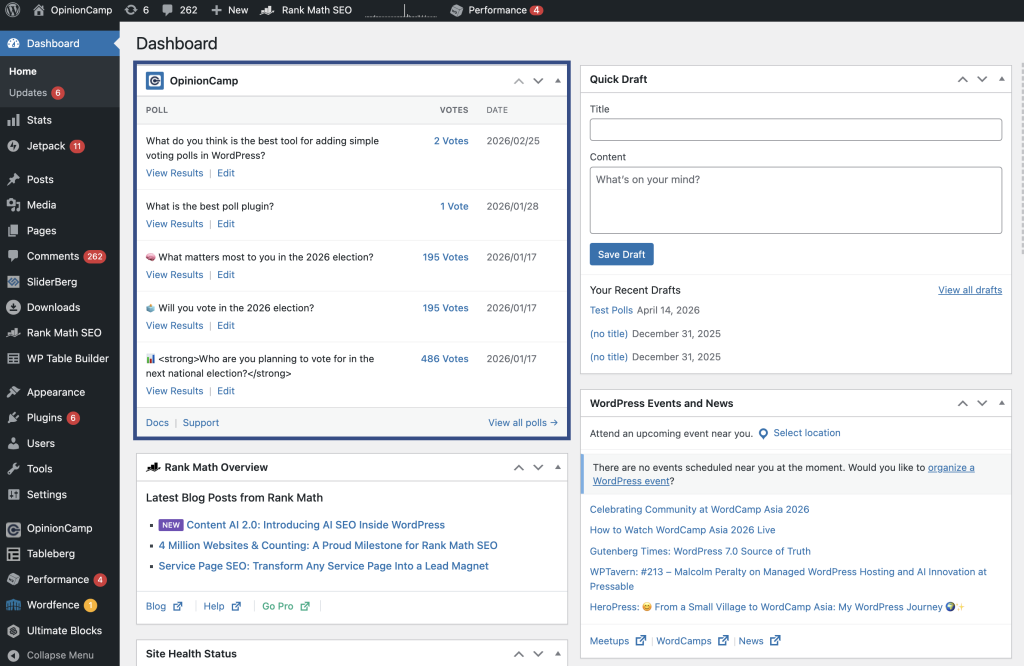
Each row has two quick links. View Results jumps you straight to the poll’s results page. Edit takes you to the post or page the poll lives in, so you can update the question, options, or settings without hunting for the poll first.
At the bottom of the widget, you’ll find links to docs and support, plus a View all polls → link that opens the full OpinionCamp dashboard.
Most poll plugins for WordPress don’t show activity on the dashboard home. You have to go looking for it. We think that’s backwards. If a poll is live on your site, you should see it the moment you log in.
New Controls for Closed Polls
Closing a poll used to be a one-size-fits-all affair. You closed it, visitors saw a generic message, and that was it. Not enough control for publishers who want closed polls to keep earning engagement.
1.0.5 adds a new Poll state messages panel in the block sidebar with two settings.
Status
Set the poll to Open or Closed directly from the block sidebar. No workaround, no extra clicks, no separate settings screen.
When Poll Is Closed
This is the one publishers have been asking for. When a poll is closed, choose what visitors see:
- Disable inputs. The poll stays visible, but voting is turned off.
- Hide the poll. The poll is removed from the page entirely.
- Show poll result. Visitors see the final vote breakdown instead of the voting form.
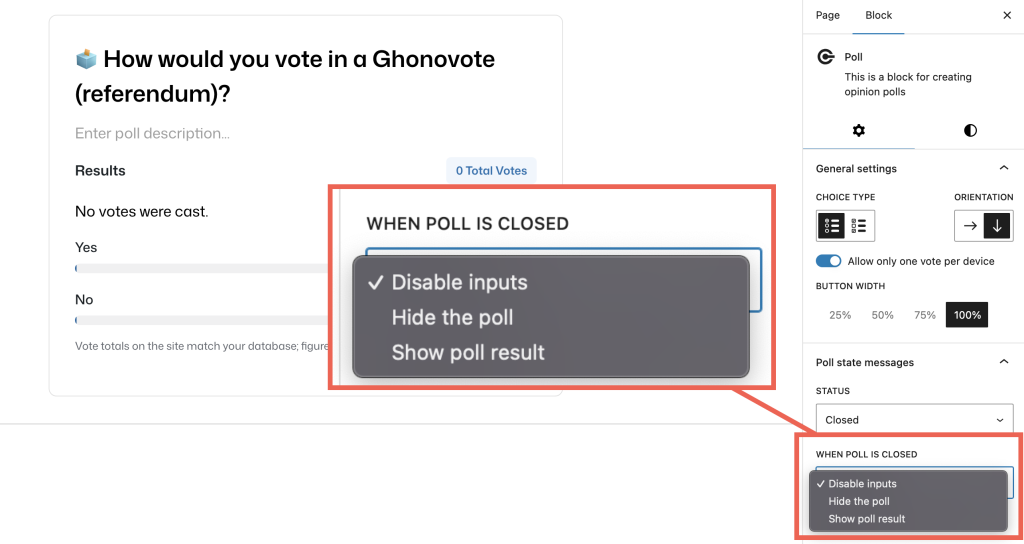
For news sites, reader surveys, and anything election-related, Show poll result is usually the right default. You closed the vote, but the results are the whole reason the poll existed in the first place. People should still be able to see them.
Order Your Results the Way You Want
Also new in 1.0.5: a Result Order dropdown that controls how options are stacked when results are shown.
- Original order. Matches the order you added options in the editor.
- Most votes first. Ranks options from highest to lowest vote count.
- Fewest votes first. Ranks from lowest to highest.
Most votes first works for most use cases. It puts the winner at the top and tells the story of the poll at a glance. Use Original order when position carries meaning: yes/no questions, Likert scales, and similar structured polls. Fewest votes first is useful for underdog stories and “what people aren’t picking” analysis.
Smaller Improvements
A few other things worth noting.
Show results by default after voting. When a visitor votes, showing them the current results is almost always the right response. 1.0.5 makes this the default behavior where it wasn’t before. New polls work the way most people expect out of the box.
Pagination alignment in the admin list. A small fix, but a visible one. The pagination controls on the admin poll list now line up with the search box above them. The list page looks tidier and matches WordPress core conventions.
More neutral closed poll notice. The closed poll banner used to lean on red. Red is a warning color, and a closed poll isn’t a warning. It’s information. The notice styling is now more neutral so it reads as status, not as something wrong.
How to Update
If you already have OpinionCamp installed, the update will show up in Plugins → Installed Plugins within the next day or so, depending on how often your site checks for updates. Click Update Now and you’re done. Your existing polls, votes, and settings carry forward as-is.
If you haven’t tried OpinionCamp yet, you can install it from WordPress.org and start adding polls to your posts in a couple of minutes.
What’s Next
We are working on the pro version now. You’ll be notified when the pro version is live.
Got a feature request or spotted something broken? The plugin has a Support link in the new dashboard widget. We read every message.
Leave a Reply