

OpinionCamp 1.0.8 is out. This release does two things: it gives you a way to put all of your polls on a single page, and it hands you much finer control over how a poll looks before it ever reaches a visitor.
Here’s what changed.
1.0.8
- FEATURE: Poll List block to display and vote on multiple polls
- FEATURE: Option to show vote counts after a submission threshold is met
- FEATURE: Result, accent, and more color controls
- IMPROVE: Typography across poll blocks
- IMPROVE: Poll status preview in the editor
- IMPROVE: Color control styling
- IMPROVE: Admin menu organization
- FIX: Poll option labels taking the entire width
Put All Your Polls on One Page
This is the most requested thing we’ve heard since launch. People run a poll in a post, then another in a different post, then a third somewhere else, and there’s no single place a reader can go to see them all and vote.
1.0.8 adds a Poll List block that does exactly that. Create a page, insert the block, and every poll on your site shows up in a grid. Visitors vote on each one right there in the list. No clicking through to the original post.
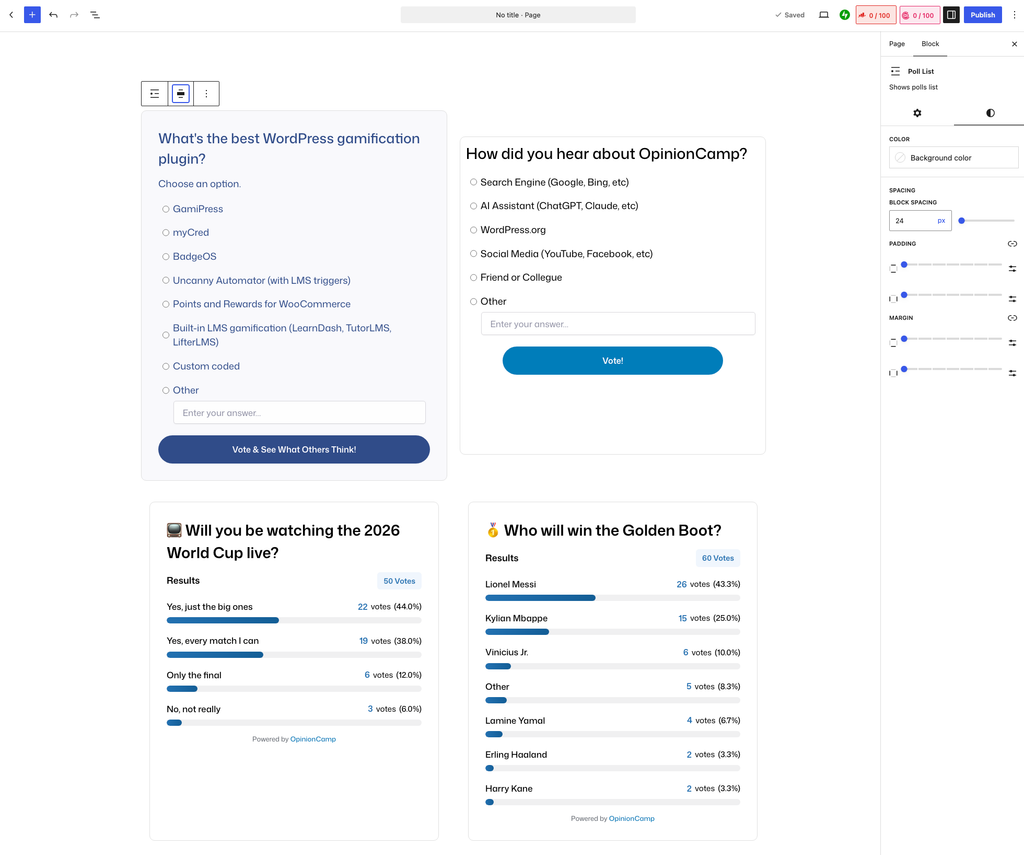
The block has four settings.
Columns. One, two, three, or four across, and you set desktop, tablet, and mobile separately. Two columns is a good default for most themes. Go to one column if your polls have long option labels.
Polls per page. Ten by default. Anything past that count moves to the next page, with pagination links below the list.
Order by. Newest first, oldest first, most votes, or title A to Z. Most votes is the interesting one here. It turns your poll page into a leaderboard of what your audience actually cared about enough to click on.
Poll status. Show all polls, only open polls, or only closed polls. Filtering to open polls keeps the page focused on what people can still vote on. Filtering to closed polls gives you an archive of results, which is worth its own page if you run regular reader surveys.
On the Styles tab you also get a background color for the list, plus block spacing, padding, and margin, so the grid can be tuned to match the rest of your page.
One thing to be clear about: you create the page yourself and drop the block in. OpinionCamp does not generate a polls archive page for you. That’s a deliberate choice for now. You decide the URL, the title, the intro copy, and what else sits on the page. A generated archive would take all of that away from you.
The Poll List block is in the free version.
Hold Results Back Until a Poll Has Enough Votes
Here’s a problem that only shows up on smaller sites. You publish a poll, one person votes, and the results now read 100% for a single option. That looks worse than showing nothing at all. It’s technically accurate and completely useless.
1.0.8 adds a Minimum votes to show results setting. You’ll find it under On submission, and it appears when Show poll result is selected. Until the poll reaches that number, voters see your success message instead of the results. Once it passes the threshold, results appear as normal.
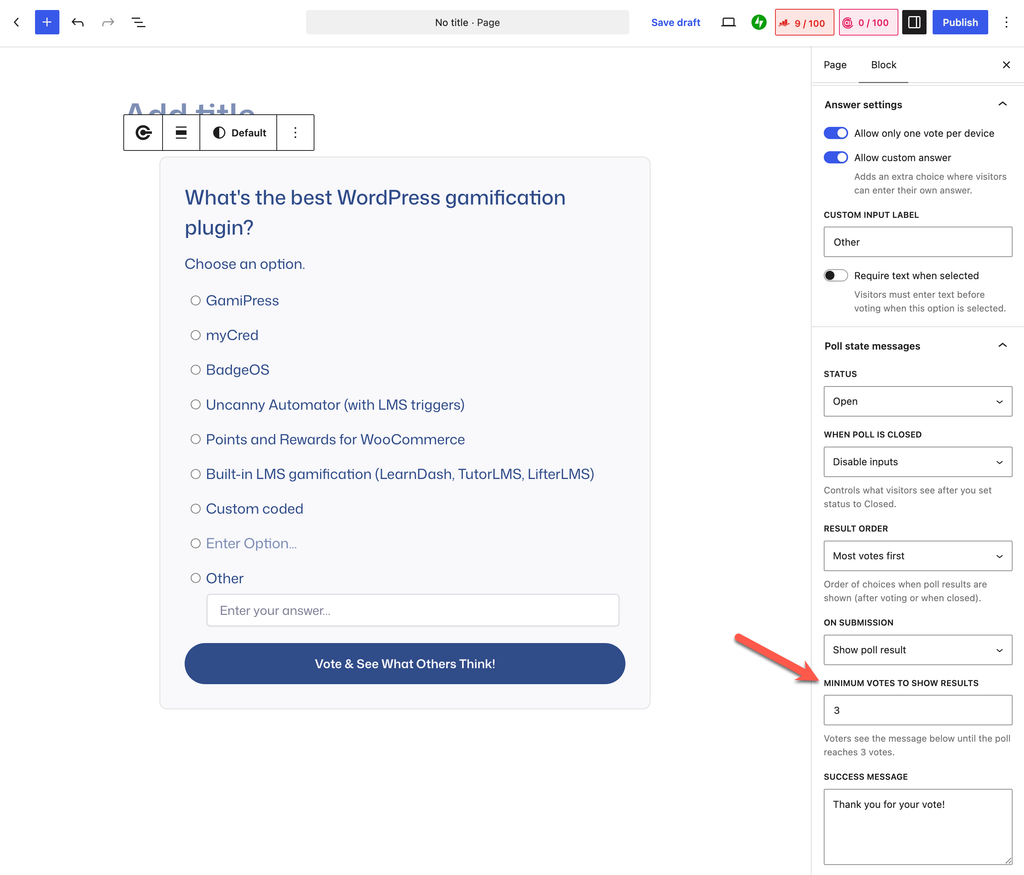
The default is 0, so nothing changes for polls you already have. Results show from the first vote unless you decide otherwise.
We went back and forth on this one. The first idea was to show percentages only and hide the raw vote counts. That turned out to be worse, not better. A single vote still reads as 100%, and now the reader can’t even tell that it came from one person. Hiding the count made the number more misleading, not less.
A threshold is the honest version. Either there’s enough data to show, or there isn’t, and until there is, the visitor just gets thanked for voting. If you run a newer site or a smaller one, setting this to something like 5 or 10 is worth doing on every poll.
More Control Over How Your Polls Look
Three changes here that add up to the same thing: every visible part of a poll can now be styled on its own, instead of the whole block sharing a handful of settings.
Colors, Grouped by What They Affect
The Styles tab is reorganized into groups that match the parts of the poll.
- Poll: text color, background color, accent color
- Vote button: button text, button background
- Results: bar fill, bar track
- Success message: message text, message background
- Closed poll: closed color
- Shadow: box shadow
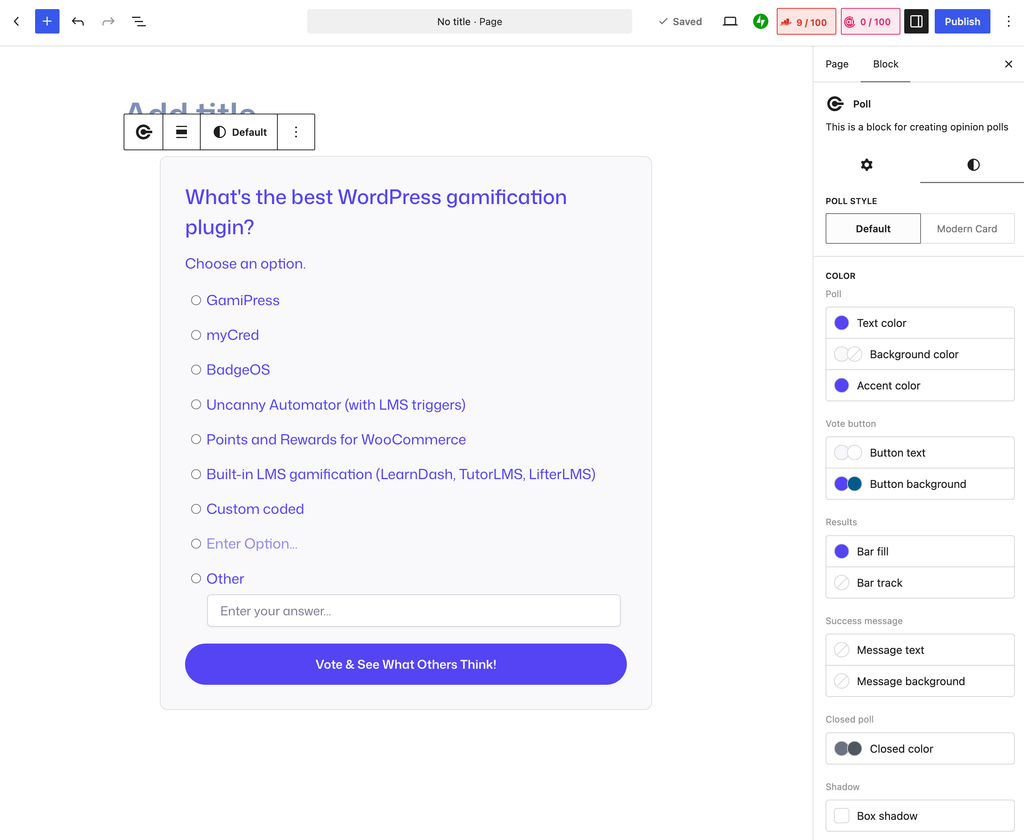
Bar fill and bar track are the additions people will notice most. The results bars used to inherit whatever the plugin decided. Now they’re yours. If your brand color is a soft green and your poll bars were showing up navy, that gap is closed.
The accent color covers the radio buttons and selection states, and closed color handles the closed poll notice, so a closed poll can now sit on your page looking intentional rather than greyed out and broken.
Typography for Title, Description, and Options
Typography is split the same way. Each part of the poll has its own controls.
- Title: font size
- Description: font size
- Option label: font size, appearance, and letter case
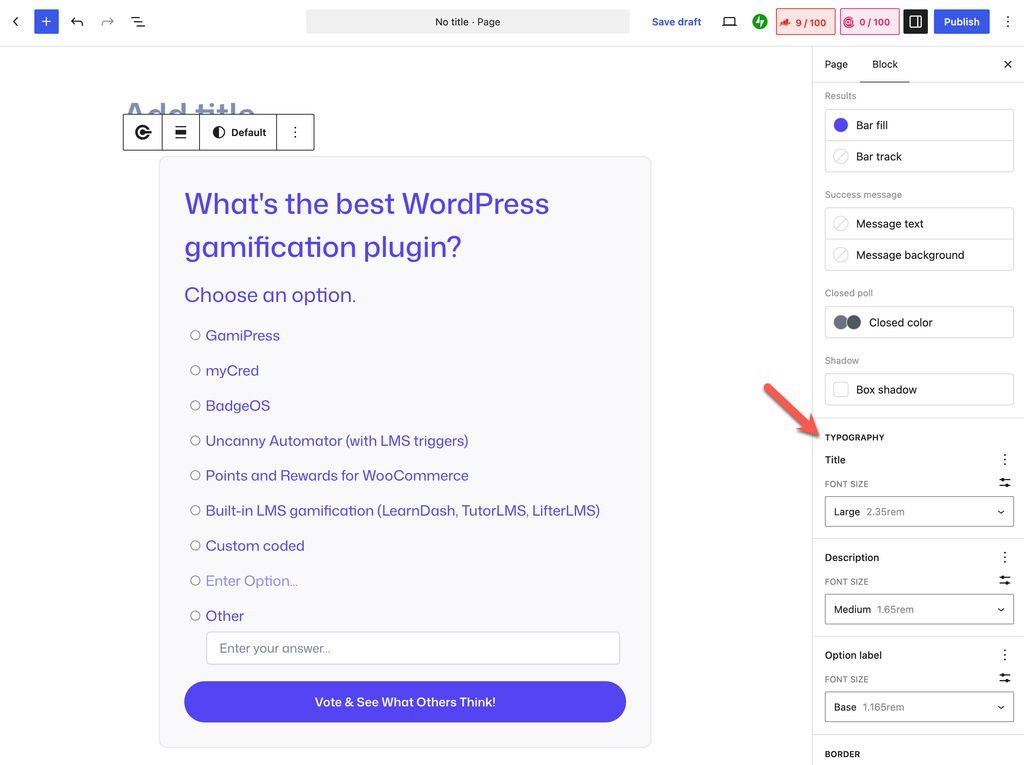
Appearance and letter case on the option label are tucked behind the three dot menu next to it, which is standard WordPress behavior for optional typography controls.
This matters most for polls with a lot of options. Long lists read better at a slightly smaller label size, and now you can do that without touching the title.
Preview Every Poll State Without Leaving the Editor
All of that styling control creates a new problem. How do you style the closed poll notice when your poll isn’t closed? How do you style the results bars before anyone has voted?
1.0.8 adds an Editor preview panel at the top of the block settings. Pick a Preview state and the canvas switches to show it:
- Poll form
- After voting (message)
- Results
- Closed
- Hidden
- Error
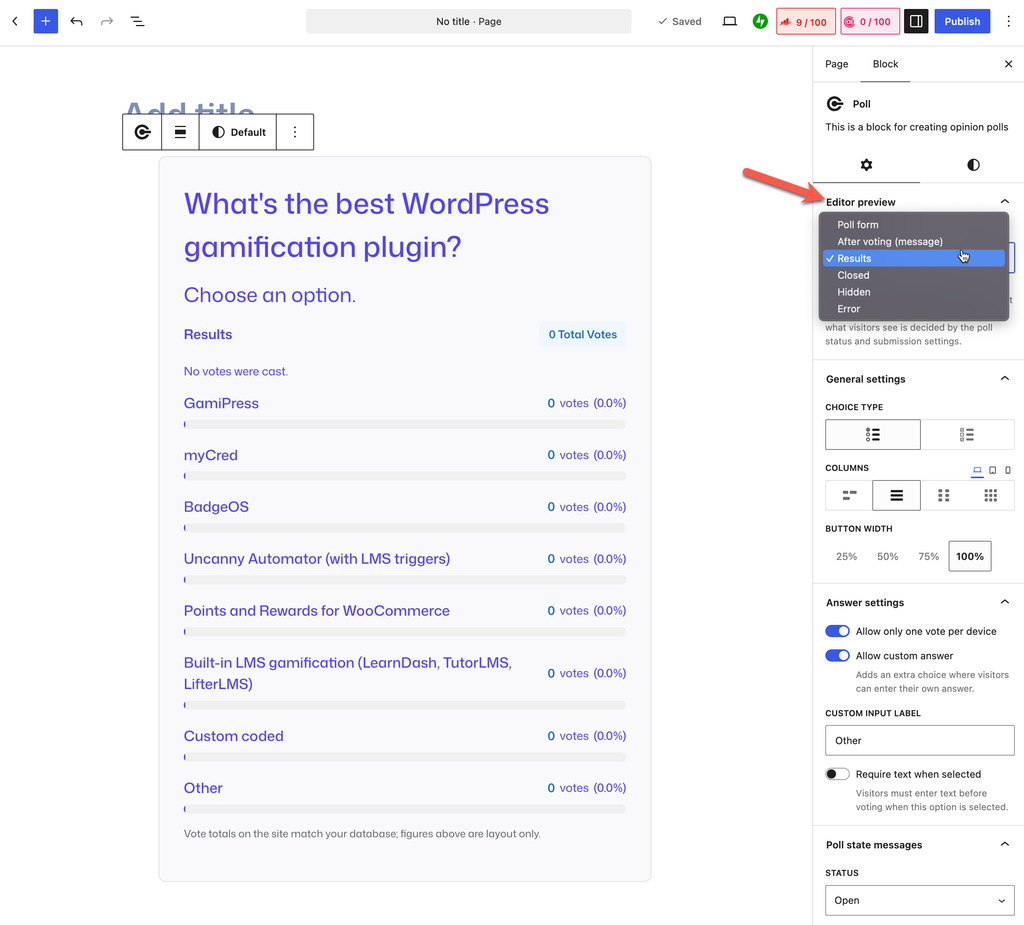
Switch to Results and you get the full results layout with placeholder bars, so you can set your bar fill and bar track and see them immediately. Switch to Closed and the closed notice appears so you can style it. Switch to After voting and your success message shows up in place.
This is editor only. Nothing gets saved, and nothing changes on your live site. What visitors see is still decided by the poll status and your submission settings. The preview state is a styling tool, not a switch.
We think this should have been there from the start. Styling something you can’t see is guesswork, and guesswork means publishing a poll, discovering the closed state looks wrong three weeks later, and going back to fix it.
Smaller Improvements
Color control styling. The color controls in the sidebar now render the way WordPress core color controls do. Small thing, but the sidebar stops looking like two different plugins stacked on top of each other.
Admin menu organization. The OpinionCamp admin menu is tidier than it was. There’s more to do here and we’ll come back to it in an upcoming release.
Option label width fix. Poll option labels no longer stretch the full width of the block.
How to Update
If you already have OpinionCamp installed, the update will show up in Plugins → Installed Plugins within the next day or so, depending on how often your site checks for updates. Click Update Now and you’re done. Your existing polls, votes, and settings carry forward as they are.
The one thing worth knowing: Minimum votes to show results defaults to 0 on existing polls, so none of them will suddenly start hiding results after you update. If you want the threshold, you set it per poll.
If you haven’t tried OpinionCamp yet, you can install it from WordPress.org and have a poll in a post in a couple of minutes.
What’s Next
OpinionCamp Pro is live, so if you’ve been waiting on that, it’s available now.
Next up we’re looking at giving polls their own dedicated pages, with shortcode support so you can drop a poll into page builders like Elementor. The Poll List block covers the “all polls in one place” case. Individual poll pages cover the other half.
Got a feature request or spotted something broken? Reach us through the support link in the OpinionCamp dashboard widget. We read every message, and a good chunk of this release came from exactly that.

Leave a Reply